


TinyMCE AI is a fully managed plugin: implementation requires adding one plugin, one JWT endpoint, and a configuration block. Tiptap's AI tools are extensions you assemble yourself, with level-of-effort ranging from Medium (AI Toolkit) to Extra Large (custom LLM via AI Generation). This guide compares both by what it actually takes to ship.
AI capabilities: What each editor includes
Both Tiptap and TinyMCE have AI capabilities and different ways of managing them. TinyMCE delivers a fully managed, out-of-the-box plugin with chat, review, and quick actions built in. Tiptap offers a modular approach through a collection of extensions that developers assemble and configure themselves. What you get out of each editor depends on what you need: A managed plugin with features readily available to configure, or custom configuration that requires time and effort.
TinyMCE AI vs Tiptap AI Toolkit
|
TinyMCE AI |
Tiptap AI |
|
|
AI chat |
Built-in; multi-turn with persistent history and document context. |
Available via AI Toolkit (beta); requires custom implementation. |
|
Quick actions |
Built-in; grammar, tone, length, translation, and custom actions included. |
Pre-configured commands via AI Generation; custom commands require additional build work. |
|
Document review |
Built-in; 5 review types configurable out of the box. |
Available via AI Toolkit (beta); not pre-built. |
|
Model support |
Gemini, OpenAI, Claude; selectable at integrator or user level. |
OpenAI default; custom LLMs via resolver functions. |
|
Managed backend |
Yes. TinyMCE handles infrastructure and model updates. |
No. Developers wire their own LLM and API. |
|
Custom UI required |
No. Toolbar buttons and sidebar panel included by default. |
Yes. Developers must build and maintain all UI components. |
|
Server-side / background AI |
REST API available for use outside the editor. |
Server AI Toolkit (alpha); requires early-access request. |
|
AI image generation |
Yes. Functionality is dependent on the AI model chosen. |
Available via AI Generation extension. |
|
Implementation effort |
Low–Medium; JWT setup and plugin config, no AI infrastructure to build. |
Medium–Extra Large; scales with extension choice; full LLM wiring and UI build required. |
|
On-premises support |
Cloud only now; on-prem planned for later 2026. |
Self-hostable; developer manages own infrastructure. |
Implementation time & effort compared
Time to implement TinyMCE AI
TinyMCE AI is a native, fully managed AI writing plugin for TinyMCE that delivers conversational chat, context-aware quick actions, and automated document review without custom AI infrastructure. Available as a premium add-on for TinyMCE cloud subscriptions (Essential tier and above), it includes access to multiple leading AI models selectable in the TinyMCE configuration.
|
Feature |
What it does |
|
Chat |
Multi-turn AI conversations with persistent history, full document context, and optional external source documents (PDFs, web resources) passed via |
|
Quick Actions |
Stateless, one-click text transformations on selected content. Built-in actions cover writing improvement, grammar, tone, length, and translation. Custom actions can be defined as |
|
Review |
Automated document-wide quality checks with inline suggestions. Five built-in review types: proofread, improve clarity, improve readability, change length, and change tone, configurable via |
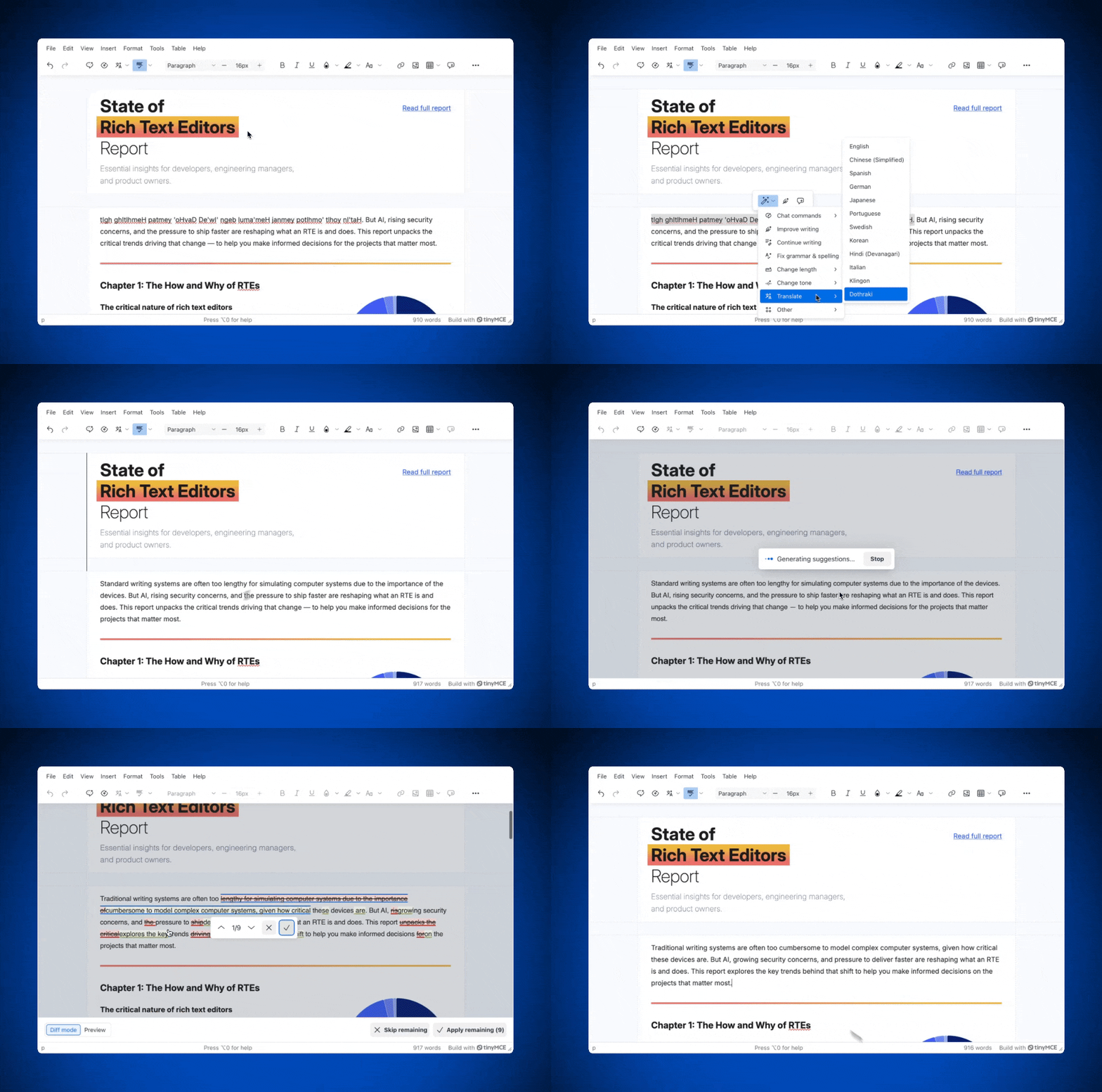
TinyMCE AI is a managed service now, but will offer on-prem support later in 2026. Authentication is handled through a JWT token that your backend generates and passes to the plugin. TinyMCE AI supports multiple AI models, selectable at the integrator level:
- Google Gemini
- OpenAI ChatGPT
- Anthropic Claude
Developers can control which models are available to users and set a default model through the plugin configuration. Model selection by end users can also be enabled or disabled.
Installation process overview
Level of effort for implementation: Low–Medium.
There is a three-step process to add TinyMCE AI to a TinyMCE installation:
- Add
tinymceaito the plugins list. The default Silver theme toolbar includes the AI buttons automatically; if you're using a custom toolbar string, addtinymceai-chat,tinymceai-quickactions, andtinymceai-reviewexplicitly. - Add a
tinymceai_token_providerfunction to the editor config. This function fetches a signed JWT from your backend and returns it as{ token: string }. - Set up a backend JWT endpoint that generates and signs a token using your TinyMCE API key and the required claims (
aud, sub, exp, iat, auth).- JWT guides are available for Node.js and PHP to make this straightforward.
- Optional configuration: Custom quick actions, available models, source document uploads,
content_idscoping, and review types can all be added through the sametinymce.init()config. Settinymceai_sidebar_type: 'floating'if your layout requires the chat or review panel to be draggable outside the editor.
For teams that need to call TinyMCE AI outside the plugin UI (background processing, server-side generation), a TinyMCE AI REST API is also available as an alternative integration path.
TinyMCE AI configuration code sample
tinymce.init({
  selector: "textarea",
  plugins: "tinymceai",
  toolbar: "tinymceai-chat tinymceai-quickactions tinymceai-review",
  content_id: "document-123",
  tinymceai_default_model: "gemini-2-5-flash",
  tinymceai_allow_model_selection: true,
  tinymceai_reviews: [
    "ai-reviews-proofread",
    "ai-reviews-improve-clarity",
    "ai-reviews-change-tone",
  ],
  tinymceai_quickactions_custom: [
    {
      title: "Explain like I am five",
      prompt: "Explain the following text in simple terms.",
      type: "chat",
    },
  ],
  tinymceai_token_provider: () => {
    return fetch("/api/token").then((r) => r.json());
  },
});
That's all it takes to make TinyMCE AI available in the editor. No AI provider accounts, no streaming logic, and no custom UI to maintain.
📖 Want to read more? Check out the TinyMCE AI documentation to learn more about advanced configuration.
Time to implement Tiptap’s AI tools
Level of effort: Medium for basic workflows; scales to Large for full agent implementations.
Tiptap offers three AI extensions. They vary significantly in complexity, flexibility, and where in your stack the AI work happens.
|
Extension |
Status |
Where it runs |
LLM support |
Key capabilities |
|
AI Toolkit (Paid add-on) |
Beta |
Frontend (browser) |
Framework-agnostic |
AI agents, review workflow, streaming, multi-doc editing, schema awareness, pre-built workflows. |
|
Server AI Toolkit (Paid add-on) |
Alpha |
Server-side |
Framework-agnostic |
Background automation, no active editor needed, Tiptap Shorthand, up to 80% token reduction. |
|
AI Generation (Start plan) |
Available |
Frontend (Browser) |
OpenAI default; custom LLM via resolvers |
Pre-configured commands, autocompletion, image generation, custom commands. |
The range here is real, but so is the tradeoff: more flexibility means more of the implementation lands on your team. Unlike TinyMCE AI, there's no managed backend doing the heavy lifting. You're wiring your own LLM, building your own UI, and owning every prompt.
AI Toolkit installation
AI Toolkit requires purchasing the paid add-on, then following the standard private registry authentication. Installation itself is straightforward:
- Install
@tiptap-pro/ai-toolkitvia the private registry. - Add
AiToolkitto the extensions array in your Tiptap instance. - Access toolkit methods via
getAiToolkit(editor).
There is no Tiptap backend credential configuration, so you wire in your own AI provider directly. The bulk of implementation work is how your backend communicates with your chosen LLM.
Server AI Toolkit installation
Level of effort: Large, plus the restricted-access requirement adds an indeterminate amount of lead time before implementation can begin.
Server AI Toolkit requires requesting early access from Tiptap before any implementation can begin. Factor lead time into your project timeline before committing to this path. Once access is granted, setup involves:
- Extracting schema awareness data from your editor instance using
getSchemaAwarenessData()and storing it so the server knows your document structure. - Generating a JWT with your Tiptap Cloud AI credentials (App ID + secret key), and optionally your Document Server credentials if you want the toolkit to fetch and save Tiptap Cloud documents automatically.
- Calling the REST API endpoints with the JWT in the Authorization header.
Documents can be passed directly in the request body if you manage your own storage instead of using Tiptap Cloud.
AI Generation installation
Level of effort: Large for the default OpenAI setup, Extra Large to integrate your custom LLM.
AI Generation follows the standard Tiptap extension pattern. For the default OpenAI setup:
- Install
@tiptap-pro/extension-aivia the private registry. - Add the
Ai.configureto your extensions array, with your App ID and a JWT generated from Tiptap's Content AI secret. - Add your OpenAI API key to your Content AI app in Tiptap Cloud settings.
At that point you have access to OpenAI models and the default command set, but you still need to build the UI buttons for each command you want to expose. Implementing every default command will take hours before any custom work begins.
For a custom LLM, override the three resolver functions defined on the extension, each of which is a Promise that fetches from your LLM's API. The effort here depends entirely on which LLM you're integrating, since each API has different requirements and behavior.
Wrap up: Choose the right AI-enabled RTE for your app
If you need production-ready AI without dedicating engineering resources to building it, TinyMCE AI is the easier path. Chat, review, and quick actions work out of the box. Model selection, custom prompts, and role-based access are all configurable through the same init script. The managed infrastructure handles the parts that are genuinely hard to build well, and the TinyMCE team handles updates as models and APIs evolve.
TinyMCE AI is available as an add-on on the Essential plan and above. Start your TinyMCE free trial today and see how it performs in your app.
FAQ
Which is faster to implement: TinyMCE AI or Tiptap AI?
TinyMCE AI. Adding the plugin, configuring a JWT endpoint, and setting up your toolbar takes a few hours. Tiptap's AI extensions require you to wire your own LLM, build your own UI, and manage your own prompts. That work scales from a weekend to weeks depending on which extension you choose.
Does Tiptap AI support Claude or Gemini?
Not natively. Tiptap's AI Generation extension defaults to OpenAI, and supporting a different model means implementing custom resolver functions yourself. TinyMCE AI supports Claude, Gemini, and OpenAI out of the box, with model selection configurable at the integrator or end-user level.
Can I use TinyMCE AI with a custom LLM?
Not directly through the plugin. TinyMCE AI connects to a managed backend that supports Gemini, OpenAI, and Claude. If you need a custom or self-hosted model, the TinyMCE AI REST API is an alternative integration path for server-side and background use cases. On-prem support for TinyMCE AI will arrive later in 2026.
What is the difference between Tiptap AI Toolkit and AI Generation?
AI Generation is the entry-level extension available on the Start plan. It gives you OpenAI-powered commands and autocompletion, but you build the UI yourself. AI Toolkit is a paid beta add-on with more advanced capabilities including agent workflows, document review, and streaming. Both put the implementation work on your team.


